Policy
Decide how strict a project is, read its policy, and switch it. A policy says who must answer each kind of question and what an agent's answer is worth.
What a policy is #
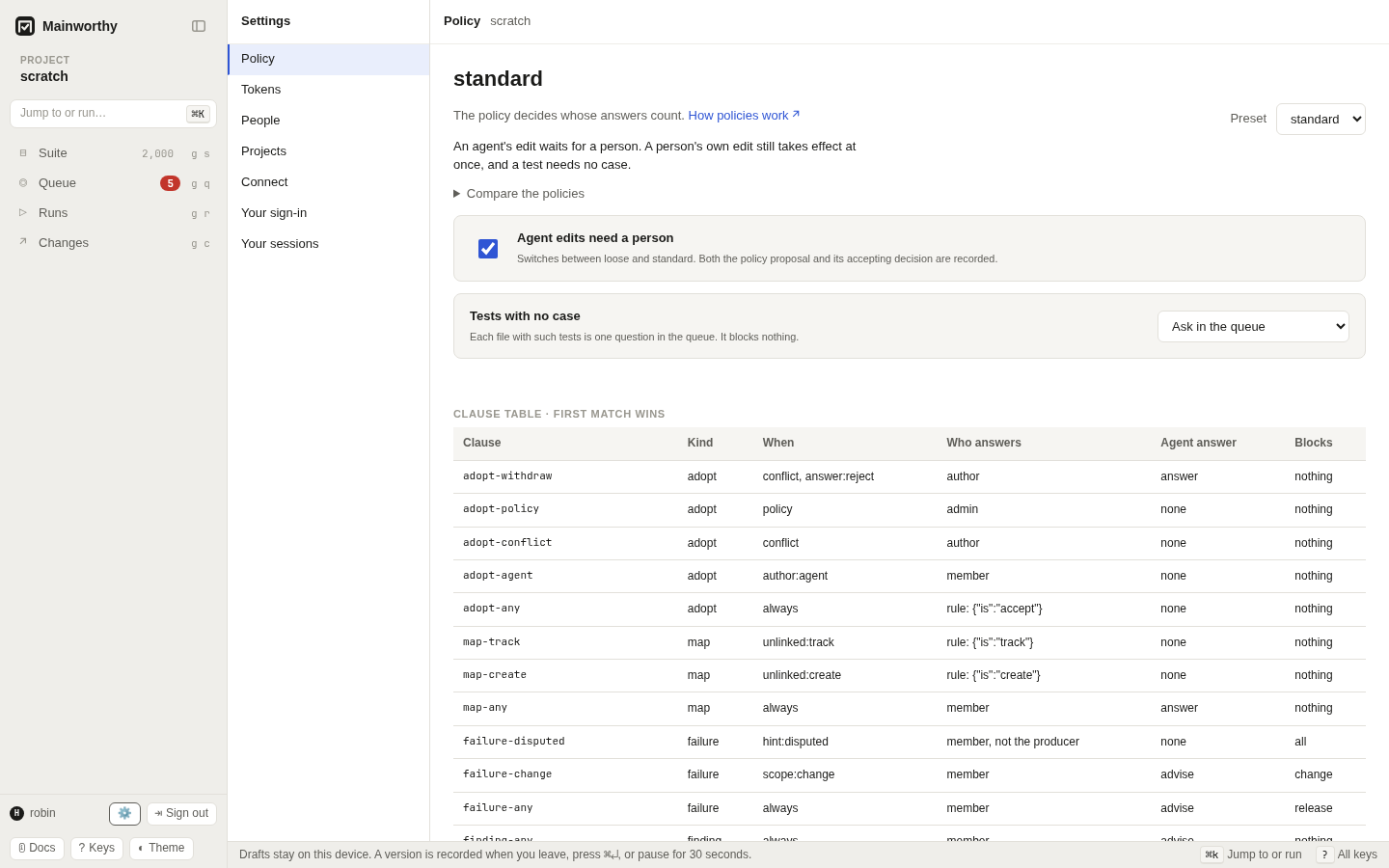
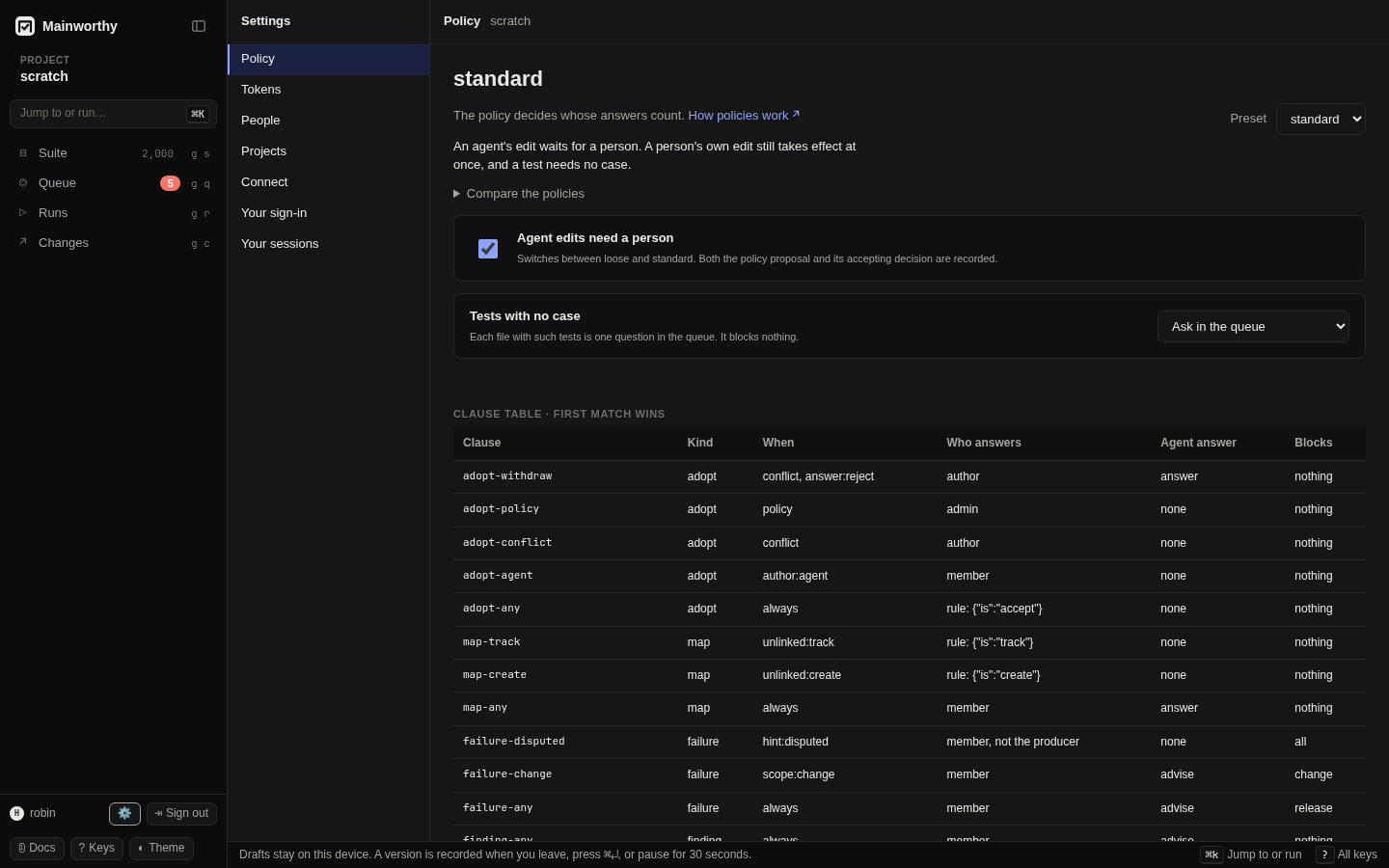
A policy is a table of clauses. Each clause covers one kind of question: a proposed edit, a test with no case, a failed result, a finding, or closing a run. For that kind it says who answers, whether they give a reason, and what an agent's answer is worth. Mainworthy reads the clauses of a kind from the top and uses the first one that matches.
The when column holds the conditions a clause tests. always matches every question of its kind. The others describe the question: author:agent for an edit by an agent, conflict for an edit that clashes with a newer version, policy for a change to the policy itself, scope:change for a failure on a change, hint:disputed for two reports that disagree, and verdict:passed for a run that passed. answer:reject matches only once someone picks that answer. unlinked:track and unlinked:create test the project's choice for tests with no case.
"Who answers" is one of these.
- A rule. Nobody is asked. The policy gives its answer at once and records it as a decision. A person with the
answercapability can still overrule it. - A member. A person with the
answercapability. - An admin. A person with the
admincapability. - The author. The person who wrote the proposal, or an admin.
An agent's answer is one of three things. It counts as a decision, it is shown as advice and a person decides, or it is refused. The table also says whether a person who produced the evidence may answer, and whether the answer needs a reason.
A policy never decides a verdict. A failure that nobody has explained blocks every run that shows it, under all three presets. The policy decides who may explain it. The blocks column only says which runs list a question.
Read the policy #
In Settings, open Policy (g ,). It shows the preset in force, a short summary, and "Compare the policies". An instance admin also sees the clause table and the numbers below it.
From the command line:
$ mainworthy policy show
policy: loose
kind     when                      who answers  agent's answer  blocks   rule's answer
adopt    conflict & answer:reject  author       counts          nothing
adopt    policy                    admin        refused         nothing
adopt    always                    rule         refused         nothing  {"is":"accept"}
map      unlinked:track            rule         refused         nothing  {"is":"track"}
map      unlinked:create           rule         refused         nothing  {"is":"create"}
map      always                    member       counts          nothing
failure  scope:change              member       advice          change
failure  always                    member       advice          release
signoff  verdict:passed            rule         refused         nothing  {"is":"approve"}
basis: exact-or-assumed; flaky hold: 14 days; tests with no case: track
The last line holds the settings. The basis is which evidence a planned run accepts for a slot by default, and strict raises it to exact. The flaky hold is how many days a "Flaky" answer carries forward. The third says what happens to a test with no case.
The three presets #
loose is the default. Edits take effect at once, a test needs no case, and a person answers failures and findings. A run that passed closes by itself.
standard holds an agent's edit for a person. A person's own edit still takes effect at once, and a test needs no case. Two reports that disagree go to a person who did not produce either one.
strict asks a person for every edit, test with no case, failure, finding and passed run, and the person gives a reason. No agent answers any of them. Approval by a named role or by two people is not built yet, so strict is as far as the product goes today.
All three send a change to the policy to an admin, and send a conflicting edit back to its author. The presets differ most in what they ask of people, so this table, built from the presets themselves, shows who answers each question.
| Preset | In short |
|---|---|
loose | Edits to cases take effect at once and a test needs no case. A person is asked about failures and findings, and a run that passed closes by itself. |
standard | An agent's edit waits for a person. A person's own edit still takes effect at once, and a test needs no case. |
strict | A person, never an agent, answers every edit, test with no case, failure, finding and passed run, and gives a reason. The project can have its tests with no case tracked instead. A policy change and a conflicting edit are handled as under the other presets. Approval by a named role or by two people is not built yet. |
Who answers each question:
| Question | loose | standard | strict |
|---|---|---|---|
| A person's edit to a case | By rule: Accept | By rule: Accept | A person, with a reason |
| An agent's edit to a case | By rule: Accept | A person | A person, with a reason |
| A test with no case | By rule: Track without a case | By rule: Track without a case | A person, with a reason |
| A failed result | A person; agents advise | A person; agents advise | A person who did not report it, with a reason |
| A result that two reports disagree on | A person; agents advise | A person who did not report it | A person who did not report it, with a reason |
| A finding | A person; agents advise. Duplicate: a person or an agent | A person; agents advise | A person, with a reason |
| Closing a run that passed | By rule: Approve | By rule: Approve | A person, with a reason |
| An edit that conflicts with a newer version | Its author if a person, or an admin. Reject: its author (person or agent), or an admin | Its author if a person, or an admin. Reject: its author (person or agent), or an admin | Its author if a person, or an admin. Reject: its author (person or agent), or an admin |
| A change to the policy | An admin, not an agent | An admin, not an agent | An admin, not an agent |
How long a flaky answer carries forward | 14 days | 14 days | 14 days |
| What fills a slot of a planned run | Also a result assumed to be for the current version | Also a result assumed to be for the current version | Only a result that names the pinned version |
Tests with no case #
A pipeline reports tests that no case names. What happens to them is one choice for the whole project, apart from the preset.
| Choice | What happens |
|---|---|
Track without a case (track) | The tests are kept without cases and nobody is asked. They still gate the build. loose and standard start here. |
Create a case for each test (create) | Each test gets a case named after it, in a folder named after its file's directory, and is linked to it. Nobody is asked. |
Ask in the queue (ask) | Each file with such tests is one question in the queue. It blocks nothing. strict starts here. |
In Settings, open Policy and choose under "Tests with no case". From the command line:
$ mainworthy policy tests create
tests with no case: create; proposal P-3 and decision 4 are both recorded; 12 open questions answered by the rule
The change is a proposal and a decision like any policy change, so it needs produce and admin on the project. It takes effect for the questions that are already open: the rule answers every open question about a file at once, and the line above says how many. A question that a person took back from the rule stays with people.
create makes cases the way a person's edit does, so it works where the policy adopts a pipeline's new case by rule. strict has a person adopt every new case, and refuses create:
invalid: under this policy a person adopts every new case, so a rule cannot create cases for tests: choose ask or track
Under create, anyone who can report results can add cases, one for each test name they send. A report still cannot change or remove a case. Under standard an agent's report is the exception: an agent's new case waits for a person, so the rule makes none and the file's question stays open.
A link holds for the tests it names. When another test turns up in the same file, only the new test is asked about or given a case. A "track" answer is about the file as it was, so the file is looked at again when its tests with no case change. Under track the rule answers again and you see nothing.
A custom policy reads the choice only if its clauses test unlinked:track or unlinked:create. Settings offers the choice under a preset.
Switch the policy #
- Open Settings, then Policy.
- Choose a preset in "Preset".
The switch "Agent edits need a person" is a shortcut. It flips between loose and standard. It is hidden while the policy is custom.
From the command line:
$ mainworthy policy use standard
policy: standard; proposal P-1 and decision 1 are both recorded
You hold the right to switch when you have produce, to propose, and admin on the project, to accept. A switch is a proposal, and accepting it is a decision. Both stay in the record, and you can find them in Queue under "Settled". No agent can accept one, whatever its grant says.
If you cannot accept it yourself, the proposal stays open for an admin:
$ mainworthy policy use strict
policy proposal P-2: open Q-2 needs an admin
An admin finds it in Queue under "Proposals". Reading the clause table needs admin on every project, which is more than switching needs.
A policy change rewrites nothing that is recorded. Results, decisions and cases stay as they were. What changes is who may answer, and whether a reason is needed. That holds for the next question and for every question that is still open: an open question now waits for whoever the new policy names. One kind of question is answered at the change: where the new policy has a rule for tests with no case, the rule answers the open questions about them, and under create that makes their cases.
Change single clauses #
Settings has no control for one clause. To change one, send a policy edit to mainworthy propose. The edit carries the whole clause list, so start from what mainworthy policy show --json prints, change a clause, and send it back. This example, with the clauses cut to [...], makes a reason mandatory for findings and shortens the flaky hold to 7 days:
$ mainworthy propose --json '{"edits":[{"op":"policy","preset":"standard","clauses":[...],"settings":{"unlinked":"track","basis":"exact-or-assumed","holds":{"flakyDays":7,"infraThisTargetOnly":true}}}]}'
{"proposal":"P-9","question":"Q-9","conflicts":[],"status":"open","needs":"an admin","cases":[]}
An admin accepts it like any policy change. Mainworthy refuses a policy in which some kind of question has no last clause that matches always:
invalid: every kind must end with a clause that always matches; missing for: finding
The settings are sent whole: unlinked, the basis and the holds. The flaky hold takes 1 to 365 days. infraThisTargetOnly is true when an "Infrastructure" answer covers only the build it was given for.
What custom means #
A policy is custom when its clauses are not exactly those of a preset. A preset's name can stay on the stored policy after you edit its clauses, so Mainworthy compares the clauses and not the name. Settings and mainworthy policy show then say custom, the preset summary and the compare table's marked column go away, and the switch between two presets is hidden. Choosing a preset in "Preset", or mainworthy policy use, replaces every clause with that preset's.
Choose a preset for a new project #
Choose the first policy when you create a project. In Settings, open Projects and pick "Initial policy" under "Create a project". It defaults to loose. You can switch later without migrating anything.
- Start with
loosewhen one person or a small trusted team writes the cases, and you want the queue to hold only failures. - Use
standardwhen agents propose edits and a person should read each one first. - Use
strictwhen each answer needs a person and a recorded reason, for example when someone else audits the queue.
Whether each test needs a case is a separate choice. Leave it at "Track without a case" when the cases describe what people check and the pipeline's tests stand beside them. Choose "Create a case for each test" when every test should appear in the suite. Choose "Ask in the queue" when someone links each file's tests by hand.
A policy belongs to one project. A team can run a loose scratch project and a strict release project on one instance.
See also #
- People, agents and pipelines for who holds
answerandadmin. - Let an agent in for what an agent's work is worth under each preset.
- Decide in the queue for answering a question.